
The offline API and AI client that also does your security work.
Test APIs, MCP servers and LLMs, mock all of them locally, and do the cryptography on your own machine — free, no account, no telemetry.
macOS (arm64 / x64) · Windows (x64 / arm64) · Linux (deb / AppImage)
- API protocols HTTP · SOAP · GraphQL · gRPC · WebSocket · Socket.IO · MQTT · SSE
- AI & MCP MCP client · MCP security scan · AI Chat that can call MCP tools
- Mock servers HTTP · SSE · AI (LLM) · MCP mocks, on 127.0.0.1 by default
- Security toolbox Keystores · mTLS · JWT / JOSE · JWK / JWKS · WS-Security · SAML · TLS — the private key never leaves the app
Built by Apinizer for banking, government, insurance and healthcare — teams whose production credentials must never leave the machine.
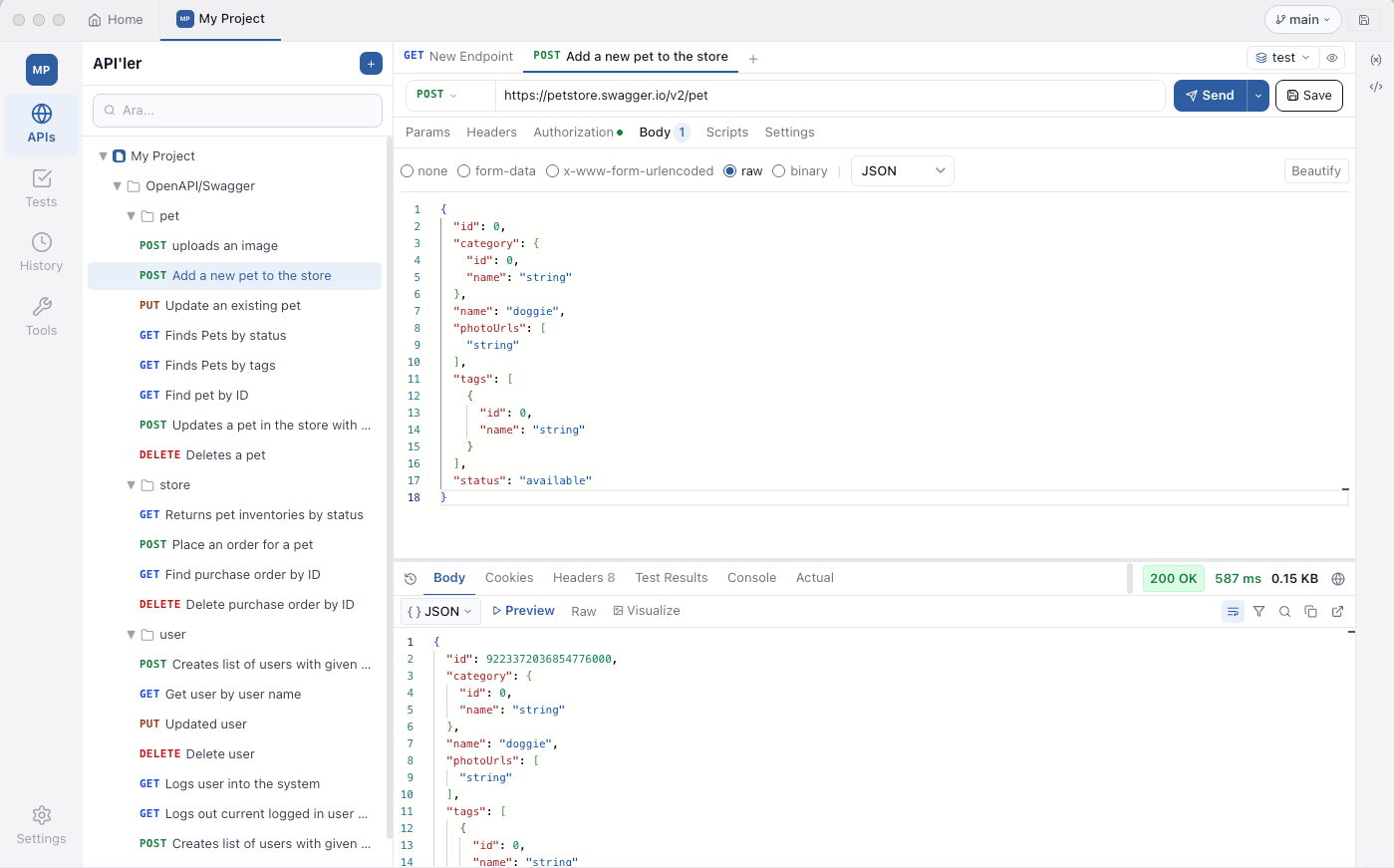
Imported a Swagger spec, ran a POST, got a 200. No account, no cloud sync, no telemetry.
New in 1.6.0
AI, MCP and streaming.
Test the servers your agents talk to, check them for security problems, and mock the model, the tools and the event stream when you would rather not call the real ones.
A full MCP client
Streamable HTTP, legacy SSE and stdio. Protocol 2024-10-07 through 2026-07-28 — Auto, Legacy or a pinned version. Tools, resources, prompts, notifications and the raw JSON-RPC frames, plus an OAuth 2.1 debugger.
MCP security scan
A graded A–F report across transport, authentication, protocol behaviour, prompt-injection heuristics, information disclosure, CORS, security headers and an opt-in rate-limit probe. Exports as one HTML file.
AI Chat with MCP tools
The assistant can call tools from your MCP servers — and every call asks for your approval by default. Each reply shows time to first token, duration and token usage. Conversations stay on this machine.
Mock SSE, LLM and MCP servers
Stream events, answer the OpenAI and Anthropic APIs, or serve MCP tools — with latency and errors you choose. Develop an agent without a provider account, and without spending a token.
AI Chat sends your messages straight to the provider you configure, and the MCP client connects to the server you point it at — nothing goes through us. The mock servers need no network at all.
The four guarantees
Your data never leaves your machine.
Not when you decode a JWT. Not when you sign an XML envelope. Not when you check for updates. Not ever.
100% Offline
Air-gapped networks supported. The app sends API requests only to the targets you configure — never to a vendor server. No cloud login, no account, no telemetry.
Local Storage Only
Workspaces, projects, environments, history, certificates and secrets live in a single SQLite database on your disk. Move it, back it up, delete it — your call.
Internal Git & Local DB
Tests live next to your code in your existing Git repo. Built-in simple-git integration means collections branch and review through your normal PR pipeline.
Zero Data Leakage
The renderer has CSP connect-src self — physically incapable of reaching the public internet. Every API call goes through an audited main-process IPC handler you control.
Why offline matters
Where your data actually goes.
| Concern | SaaS API clients | Testnizer |
|---|---|---|
| Where collections live | Vendor cloud workspace | Local SQLite on your disk |
| Where tokens are stored | Synced to vendor servers | OS keychain (Keychain / DPAPI / libsecret) |
| JWT decode | Web app sends token to a remote service | Local crypto — token stays in process |
| WS-Security sign / encrypt | Online tools or separate desktop app | Built-in main process with xml-crypto + Node crypto |
| Telemetry | On by default | None — and no opt-in either |
| Air-gapped network | Doesn't work | Works |
Protocols
Test what enterprise systems actually run on.
Not just REST. SOAP envelopes, gRPC streams, WebSocket and MQTT sessions, event streams and MCP servers — first-class, on-device.
HTTP / REST
Params, path variables, headers, every body mode, cookies, mTLS, proxy, redirects, scripts and assertions. Paste a cURL command into the URL bar.
SOAP / WSDL
WSDL import, SOAP 1.1 + 1.2, manual envelopes, and WS-Security applied on Send and in the Runner.
gRPC
.proto import, all four streaming modes, metadata, JSON skeleton from message fields.
GraphQL
Queries, mutations, schema explorer, and subscriptions over WebSocket (graphql-transport-ws, with graphql-ws fallback).
WebSocket
Text, JSON, XML, HTML, Base64 and hex messages, saved messages, a searchable log with filters.
Socket.IO
Client v2, v3 or v4, namespaces, auth, acknowledgements, several arguments per emit, per-event listen switches.
MQTT
MQTT 3.1.1 and 5.0 — QoS, retain, last will, TLS with your certificates, MQTT 5 properties, saved messages.
Server-Sent Events
Long-lived streams with custom headers, Last-Event-ID resume and an event-type filter.
MCP
Streamable HTTP, SSE and stdio. Tools, resources, prompts, raw JSON-RPC frames, OAuth 2.1 and a security scan.
AI Chat
14 providers plus a Custom URL, streaming, MCP tools with approval. Requests go directly to the provider you configure.
Built-in tools
All the things you'd otherwise paste into jwt.io.
Every utility runs on-device. No round-trips to a third-party site to "format your JSON" or "decode your token." If the network is off, the tools still work.
- JWT debugger
- WS-Security workbench
- AES / RSA encrypt / decrypt
- XML Signature & Encryption
- JSON / XML formatters
- Base64 / URL / Hex encoders
- JSONPath / XPath / XSLT / Jolt
- Text diff
Migration
Bring your existing collections.
Drop in any Postman file and Testnizer works out what it is — scripts, variables and saved examples included — and ends the import with a report of what was converted or skipped. A project exports back to Postman v2.1 or v3, OpenAPI 3 and Insomnia.
Need enterprise support?
The free binary is distributed as-is, with no maintenance or security-patch obligation. If your organization needs paid support, response-time SLAs, on-premise deployment assistance, training, or custom development — typical for banking, public sector, defense, healthcare, and regulated infrastructure — get in touch.
Free. No vendor lock-in. No subscription.
Testnizer is built and maintained by Apinizer. There is no "pro" tier, no cloud workspace upsell, no waitlist for real features. We made it because we needed it ourselves.