
Mock Server
A real HTTP server you configure in the Testnizer UI — endpoints, conditional responses, scripting, auth, failure injection, OpenAPI/Postman import, and a recording proxy. All on 127.0.0.1.
Testnizer’s Mock Server is a real HTTP server that runs inside the app and serves the responses you configure. Use it to:
- Stand in for a backend that doesn’t exist yet (frontend-first development)
- Reproduce flaky upstream behaviour (latency, 5xx, auth failures) for tests
- Replay captured production traffic offline
- Demo apps without internet
- Validate client-side error handling against arbitrary HTTP statuses
The server binds to 127.0.0.1 by default; you must explicitly opt in to
0.0.0.0 if you want it reachable from your LAN.
You’ll find Mock Servers in the left sidebar, under the Mocks icon.
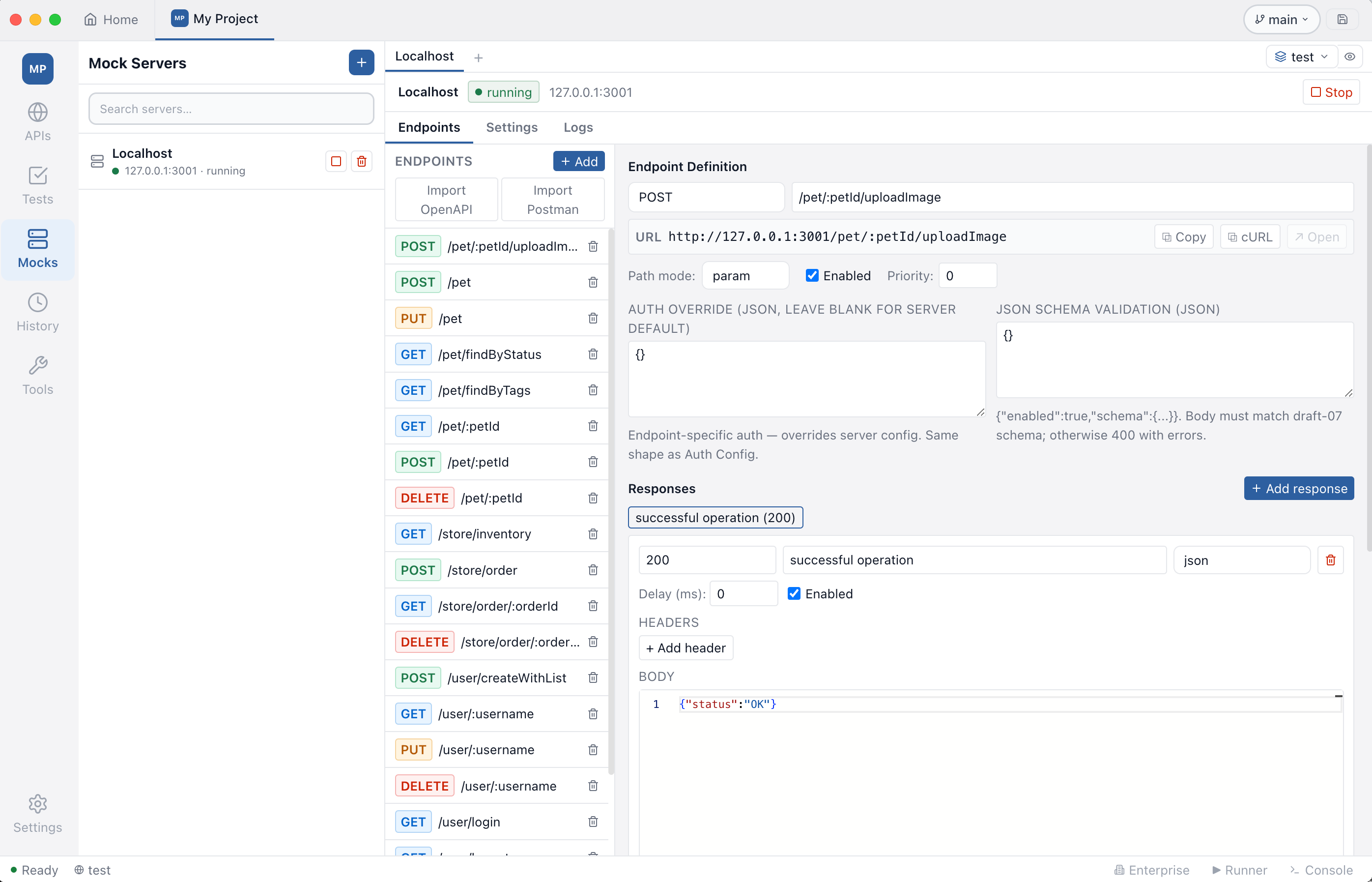
Creating a server
Click + in the Mocks panel, give the server a name and a port (1–65535). The server is created stopped. Press the green ▶ Start button on the header to listen on that port.
Each server is independent: its endpoints, in-memory state, log buffer, and rate-limit counters are scoped to that one server. You can run as many servers as your machine has free ports.
Endpoints
The Endpoints tab is split into a left list and a right editor.
Method and path
Path matching has four modes:
| Mode | Pattern | Example | Matches |
|---|---|---|---|
exact | literal | /users | only /users |
param | :name placeholders | /users/:id | /users/42 (id = “42”) |
wildcard | * (segment), ** (any) | /api/*, /api/** | one segment / any depth |
regex | full RegExp with named groups | ^/v(?<v>\d+)/users$ | /v3/users (v = “3”) |
The HTTP method can be any standard verb or ANY (matches every method).
When multiple endpoints would match, Testnizer picks by priority
(higher wins) and breaks ties by specificity: exact > param > regex
wildcard.
The full URL is shown in a status bar under the path field. From there you can:
- Copy — copies
http://host:port/basePath/pathto the clipboard - Copy as cURL — generates a working
curlcommand (with placeholderContent-Typeand body for POST/PUT/PATCH) - Open — opens the URL in your browser. Available only when the server
is running, the method is GET (or ANY), and the path mode is
exact(browsers can’t fill in:idplaceholders for you)
Responses & conditions
Each endpoint can have many responses. When a request arrives, Testnizer walks the response list in order and picks the first one whose condition matches. If none match, the first enabled response wins as a fallback.
Conditions are JSON objects with a type discriminator. Use the Insert
example… dropdown next to the Condition field to drop in a working
template.
| Type | Use it when | Example |
|---|---|---|
always | this is the catch-all/default response | {"type":"always"} |
header | a request header has a specific value | {"type":"header","name":"X-Tenant","op":"eq","value":"acme"} |
query | a query string parameter matches | {"type":"query","name":"locale","op":"eq","value":"tr"} |
pathParam | a :name segment matches | {"type":"pathParam","name":"id","op":"eq","value":"42"} |
jsonPath | a value inside the JSON request body matches | {"type":"jsonPath","path":"$.user.role","op":"eq","value":"admin"} |
xpath | an XPath expression on the XML body matches | {"type":"xpath","expression":"//Order/Status/text()","op":"eq","value":"PAID"} |
method | filter by HTTP verb (useful with ANY) | {"type":"method","method":"POST"} |
and / or | combine predicates | {"type":"and","conditions":[...]} |
Operators: eq (string equality), neq, contains (substring), regex
(JavaScript RegExp), exists (path resolves / value present).
Examples
Return 200 for admins, 403 for everyone else — two responses on the same endpoint:
// Response 1 — condition
{
  "type": "jsonPath",
  "path": "$.role",
  "op": "eq",
  "value": "admin"
}
// Response 1 — body
{ "allowed": true }
// status: 200

// Response 2 — condition
{ "type": "always" }
// Response 2 — body
{ "error": "forbidden" }
// status: 403
Return Turkish content when ?locale=tr:
// First response — condition
{ "type": "query", "name": "locale", "op": "eq", "value": "tr" }
// body: { "greeting": "Merhaba!" }

// Default
{ "type": "always" }
// body: { "greeting": "Hello!" }
Multi-tenant routing — header AND body match:
{
  "type": "and",
  "conditions": [
    { "type": "header", "name": "X-Tenant", "op": "eq", "value": "acme" },
    { "type": "jsonPath", "path": "$.user.role", "op": "eq", "value": "admin" }
  ]
}
Templating
Response bodies and header values are rendered through Handlebars + a tiny dynamic-value layer. Available bindings:
request.method,request.path,request.headers.<name>,request.query.<name>,request.params.<name>,request.body.<field…>,request.bodyText- Handlebars helpers:
{{#if}},{{#each}},{{lookup}}, plus the built-inseq,neq,upper,lower,default,json - Dynamic values:
{{$timestamp}},{{$isoTimestamp}},{{$randomUUID}},{{$randomInt}},{{$randomInt(1,100)}},{{$randomEmail}},{{$randomString}},{{$randomString(16)}}
Example body:
{
  "id": "{{$randomUUID}}",
  "echoOf": "{{request.body.name}}",
  "createdAt": "{{$isoTimestamp}}",
  {{#if request.body.role}}"role": "{{request.body.role}}"{{else}}"role": "guest"{{/if}}
}
Pre-response script
Each response can carry a JavaScript snippet that runs in a Node vm
sandbox after templating but before the HTTP response is sent. Use it
to mutate state, override the status / headers / body, or gate access with
custom logic.
The sandbox enforces a 5-second timeout and exposes:
| Binding | What it is |
|---|---|
request | Frozen snapshot of the request — method, path, headers, query, params, body, bodyText |
state | Mutable object scoped to this server — survives across requests, cleared when the server stops |
response | Mutable object pre-populated with the picked response — status, headers, body |
console.log / info / warn / error | Captured into the request’s log entry as x-mock-script-log |
setStatus(n) | Override the response status |
setHeader(name, value) | Set a response header (lower-cased) |
setJson(value) | Set body to JSON.stringify(value) and force Content-Type: application/json |
The sandbox cannot require, access process, the file system, or the
network. Each script runs in a fresh context.
Use the Insert example… dropdown next to the Script field to drop in a working template.
Example: stateful CRUD
A single endpoint that stores incoming POST bodies and returns them on GET:
state.users ??= {}

if (request.method === 'POST') {
  const u = request.body
  if (!u || !u.id) {
    setStatus(400)
    setJson({ error: 'id required' })
  } else {
    state.users[u.id] = u
    setStatus(201)
    setJson(u)
  }
} else if (request.method === 'GET') {
  const id = request.params.id
  if (id) setJson(state.users[id] ?? { error: 'not found' })
  else setJson(Object.values(state.users))
} else if (request.method === 'DELETE') {
  delete state.users[request.params.id]
  setStatus(204)
}
Pair this with method ANY and path /users/:id? (or two endpoints, GET
/users/:id and POST /users) to get a working CRUD stub.
Example: counter that increments on every call
state.calls = (state.calls ?? 0) + 1
setJson({ count: state.calls, ts: new Date().toISOString() })
Example: random failure (chaos testing)
if (Math.random() < 0.2) {
  setStatus(500)
  setJson({ error: 'random_failure' })
} else {
  setJson({ ok: true })
}
You can also use the dedicated Failure Injection panel (in Settings) for the same effect declaratively.
Example: status from query string
Useful when stress-testing how a client reacts to arbitrary HTTP codes:
const code = Number(request.query.code)
if (Number.isFinite(code) && code >= 100 && code < 600) {
  setStatus(code)
  setJson({ requestedStatus: code })
} else {
  setJson({ ok: true, hint: 'Add ?code=NNN to override status' })
}
Example: round-robin sequential responses
const replies = [
  { status: 200, body: { ok: true, n: 1 } },
  { status: 200, body: { ok: true, n: 2 } },
  { status: 503, body: { error: 'try again' } },
]
state.idx = ((state.idx ?? -1) + 1) % replies.length
const r = replies[state.idx]
setStatus(r.status)
setJson(r.body)
Authentication, validation, failure, rate limit
The Settings tab carries four declarative panels — they apply before the script runs and short-circuit the response if they fail.
Authentication
JSON config field. Supports four types:
// no auth
{ "type": "none" }

// Bearer
{ "type": "bearer", "tokens": ["secret-1", "secret-2"] }

// Basic
{ "type": "basic", "users": [{ "username": "alice", "password": "wonderland" }] }

// API key (header or query)
{ "type": "apiKey", "in": "header", "name": "X-API-Key", "keys": ["k1", "k2"] }
Each endpoint can override the server-level auth from the Auth Override field in the endpoint editor (leave blank to inherit).
JSON Schema body validation
Per-endpoint JSON config. When enabled, the request body must match a draft-07 schema or the server returns 400 with Ajv error details:
{
  "enabled": true,
  "schema": {
    "type": "object",
    "required": ["email"],
    "properties": {
      "email": { "type": "string", "format": "email" }
    }
  }
}
Failure injection
Probabilistic 5xx or timeout simulation:
{
  "enabled": true,
  "probability": 30,
  "mode": "status",
  "status": 503,
  "timeoutMs": 30000
}
Modes: status (return status with an injected error body), timeout
(wait timeoutMs then return 504), random (50/50 between the two).
Rate limit
Sliding-window per IP or globally:
{
  "enabled": true,
  "requestsPerWindow": 100,
  "windowMs": 60000,
  "scope": "ip"
}
Above the limit, the server returns 429 with Retry-After.
CORS
Auto-handles OPTIONS preflight when enabled. Configure allowed origins,
methods, headers, credentials, and Access-Control-Max-Age from the
Settings tab.
Special modes
Echo
When echo enabled, requests to /__echo (any method) reply with a JSON
dump of the request — handy for debugging client behaviour:
curl -X POST 'http://127.0.0.1:3001/__echo' \
  -H 'Content-Type: application/json' -d '{"hello":"world"}'
# {
#   "method": "POST",
#   "path": "/__echo",
#   "headers": { "content-type": "application/json", ... },
#   "query": {},
#   "body": { "hello": "world" }
# }
Proxy passthrough
If proxy enabled is on and a request matches no endpoint, it gets forwarded to proxyTarget. The upstream response is returned unchanged. This is the right setting for “mock the new endpoints, pass everything else through”.
Recording
Turning on proxy record (with proxy enabled) persists every passed-through upstream response as a new mock endpoint. Hit your real API once to record it, then switch the proxy off and replay forever — no internet needed.
Importing existing specs
The Endpoints tab has two import buttons:
- Import OpenAPI — pick a JSON or YAML file. Testnizer dereferences
$refs and creates one endpoint perpaths.<path>.<method>. Response bodies come fromexamplesfirst, thenexample, then a sample generated from the schema. - Import Postman — pick a Postman v2.x collection. Folders are walked recursively. Each saved example response becomes a mock response.
{{var}} placeholders from Postman URLs are converted to :var path
params automatically.
Live request log
The Logs tab shows every request the server has handled (last 500 entries in memory). Click a row to see request headers, request body, response headers, and response body. Filter / refresh / clear with the buttons at the top.
When a script throws, the error message appears in the row’s error
field. Console output from console.log etc. is added to the response’s
x-mock-script-log header so you can see it inline with the body.