
Built-in tools
Reference for the offline tools shipped with Testnizer — JWT debugger/encoder, formatters, encoders, diff, JSONPath, XPath, XSLT, Jolt, WS-Security, hash, HMAC, JSON Schema, JSON↔XML, epoch, HTTP status codes, base converter.
Testnizer ships a complete set of utility tools that run entirely on your machine. There is no SaaS, no upload, no telemetry — every input and output stays inside the app process. Open any tool from the Tools tab in the left sidebar.
The goal: anything you’d usually paste into jwt.io, hashing-online, epochconverter, or a “json to xml” website — you can do it here without leaking the data.
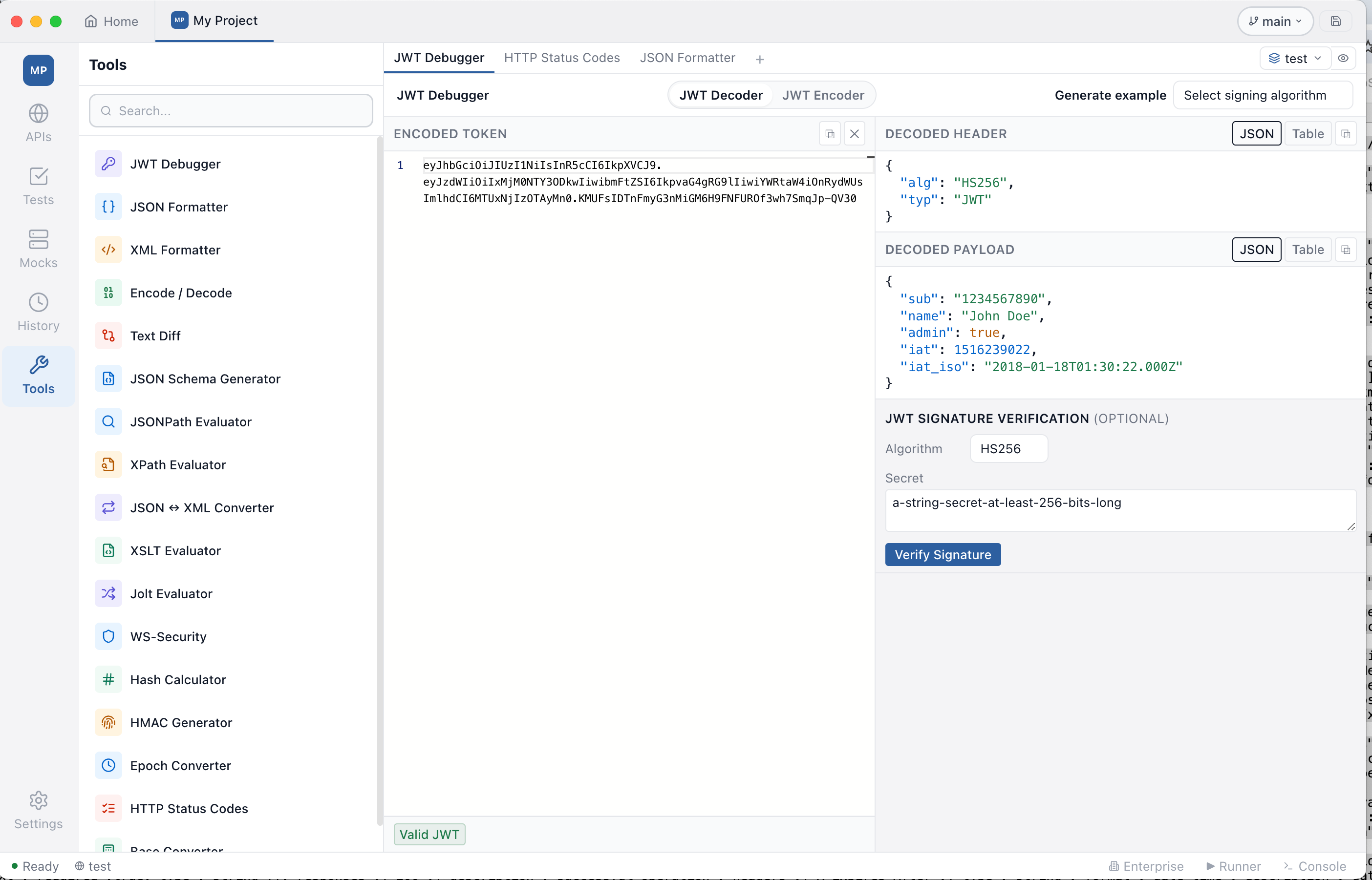
The tools menu top-to-bottom (most-used first, utility calculators at the bottom):
Content & format        ──────────────
JWT Debugger            ← decode + encode in one tab
JSON Formatter
XML Formatter
Encode / Decode
Text Diff
JSON Schema Generator
JSONPath Evaluator
XPath Evaluator
JSON ↔ XML Converter
XSLT Evaluator
Jolt Evaluator
WS-Security

Utility calculators     ──────────────
Hash Calculator
HMAC Generator
Epoch Converter
HTTP Status Codes
Base Converter
UUID Generator
Regex Tester
YAML ↔ JSON
JWT Debugger
Decodes and encodes JSON Web Tokens — fully offline. Two tabs:
- JWT Decoder — paste a token, see header + payload as JSON or as a
table with column descriptions and ISO-rendered date claims (
iat,exp,nbf,auth_time). Verify HS / RS / PS / ES / EdDSA signatures with a shared secret or PEM public key. - JWT Encoder — edit header + payload JSON, choose an algorithm, paste a shared secret or PEM private key, and get a freshly signed token.
A Generate example dropdown produces a working sample token for any algorithm — for asymmetric algos it generates a fresh keypair, signs the token, and pre-fills both panes (verify with the public key, sign with the private key) so you can experiment without hunting for keys.
See the JWT Debugger guide for the full reference.
JSON Formatter
Paste minified or malformed JSON and get:
- Pretty-printed output with configurable indent (2 or 4 spaces / tab)
- Syntax validation — exact line and column of the first error
- Key sorting — alphabetical sort of all object keys, recursively
The output pane is a Monaco editor — copy, search, and edit the result.
XML Formatter
Paste any XML document and get indented, human-readable output.
- Configurable indent width
- Optional declaration stripping (
<?xml version="1.0"?>) - Namespace-aware (namespaced attributes are preserved, not expanded)
- Roundtrip-safe: the formatter does not change the document’s information set
Useful for inspecting SOAP envelopes, OpenAPI XML bodies, and CI-generated configuration files.
Encode / Decode
A single tab with four codec modes:
| Mode | Encodes / decodes |
|---|---|
| Base64 | Standard (+/=) and URL-safe (-_) variants |
| URL Encoding | %xx percent-encoding of a query string or path component |
| HTML Entities | &, <, “, etc. |
| JWT payload | Base64URL-decodes the claims section of a JWT without verification |
Paste in either pane — encode or decode direction is toggled with the arrow button.
Text Diff
Side-by-side aligned diff for any two text blocks — JSON, XML, plain text, or code snippets.
- Per-side line numbers; line counts shown in each header
- Removed / added / modified rows with color coding
- Intra-line character-level highlights for paired modified lines, so a single character change pops out
- Ignore-whitespace and ignore-case toggles
- “Original / Changed” headers with a Swap button to flip sides
Useful for comparing two API responses, two versions of a schema, or expected vs. actual in a test failure.
JSON Schema Generator
Infer a draft-07 JSON Schema from a sample document. Helpful when you want a working schema fast — paste an example, copy the schema. Detects:
string/number/integer/boolean/null/object/array- String formats:
date,date-time,time,email,uuid,uri,ipv4 - Heterogeneous arrays as
oneOfitem schemas - Nested objects, recursively
Toggle whether all properties are required and whether to detect string
formats. The output is ready to drop into the Mock Server’s per-endpoint
JSON Schema Validation field.
JSONPath Evaluator
Evaluate JSONPath expressions against a JSON document.
- Live evaluation as you type
- Built-in canonical sample document (Goessner-style “store”) with 17 ready-to-load example queries covering authors, prices, slicing, filters, and edge cases
- Match count shown in the footer
- Bracket and dot notation, full predicate support
[?(@.price < 10)]
XPath Evaluator
Same workflow as JSONPath, but for XML and XPath 1.0.
- Live evaluation, 11 sample queries bundled, namespace bindings panel
- Last / penultimate / first-N predicates pre-built
- Useful for SOAP response assertions and XSLT debugging
JSON ↔ XML Converter
Both directions in one tool. Switch with the XML to JSON / JSON to XML pill.
XML → JSON options:
- Treat
xsi:nil="true"asnull - Write numeric-looking values as strings (preserve formatting)
- Skip empty elements
- Unwrap the root element
- Force specific jPath segments to be arrays (e.g.
bookstore.book)
JSON → XML options: root element name, ignore-nulls, ignore-empty.
Attributes are carried via the @_ prefix in JSON.
XSLT Evaluator
Apply an XSLT 1.0 stylesheet to an XML document. 8 ready-to-load samples included — extracting elements, building new XML, wrapping in a SOAP envelope, renaming nested elements, etc.
Output method (xml, html, text) is detected from the stylesheet’s
<xsl:output> declaration. Errors from the XSLT processor are shown in a
separate error panel.
Jolt Evaluator
Apply a Jolt specification to a JSON document. 17 samples bundled — Inception, prefix-soup conversions, list↔map, default values, removals, and multi-step pipelines.
Supports shift, default, and remove operations.
WS-Security
A standalone workbench for building, signing, and encrypting SOAP security headers. Same engine as the SOAP editor’s WS-Security tab.
- UsernameToken — password digest or plain text, with optional Timestamp
- Timestamp — standalone expiry token
- XML Signature — signs an element (typically
Body) with an X.509 certificate + RSA or EC key - XML Encryption — encrypts an element with AES-128/256-CBC or AES-GCM
See the WS-Security guide for step-by-step walkthroughs.
Hash Calculator
Compute MD5, SHA-1, SHA-256, SHA-384, and SHA-512 in parallel for the same input. Each row has its own copy button. Hashing happens with browser SubtleCrypto where available, with a hand-written MD5 implementation because SubtleCrypto doesn’t expose it.
Tested against canonical RFC vectors. The byte counter in the footer shows the input size.
HMAC Generator
HMAC-SHA1 / SHA256 / SHA384 / SHA512 with a shared secret. All four
algorithms compute against the same (message, secret) pair, side by side.
Tested against RFC 4231 reference vectors.
Epoch Converter
Convert between Unix timestamps and human-readable dates, both directions.
- Auto-detects the unit (seconds / milliseconds / microseconds / nanoseconds) by magnitude
- Renders the result in GMT, your local zone, ISO 8601, and as a relative string (“4 seconds ago” / “in 2 hours”)
- Inverse direction: pick year / month / day / hour / minute / second and a zone, get the epoch in seconds and milliseconds, plus the formatted strings
Updates the “current Unix epoch” display every second.
HTTP Status Codes
Searchable, category-filtered reference for 60+ HTTP status codes from RFC 9110, the IANA registry, and common WebDAV codes.
- Filter by category (1xx / 2xx / 3xx / 4xx / 5xx)
- Free-text search across code, name, and description
- Category badges color-coded for quick scanning
- Sticky category headers when scrolling
Includes legacy/oddities like 418 (“I’m a teapot”), 451 (“Unavailable for Legal Reasons”), 425 Too Early, 511 Network Authentication Required.
Base Converter
Translate between ASCII text, Binary, Octal, Decimal, and Hexadecimal representations of the same UTF-8 byte sequence. All five fields are kept in sync — type into any one and the others update.
- UTF-8 aware — multi-byte characters round-trip correctly (
€→e2 82 ac) - Hex tokens accept either case and an optional
0xprefix - Each token must be a valid byte (0–255) — invalid input shows a clear error and leaves the other fields blank until you fix it
UUID Generator
Generate v1 / v4 / v5 / v7 UUIDs in batches up to 1000.
- v4 — fully random; the most common variant. 122 random bits, ~impossible to collide.
- v7 — Unix-epoch-prefixed, time-ordered. Sortable lexicographically by creation time. Useful as primary keys.
- v5 — SHA-1 hash of
(namespace, name). Deterministic — the samenamein the same namespace always produces the same UUID. Built-in DNS / URL / OID / X.500 namespace presets, plus a custom namespace UUID input. - v1 — time + node based. Leaks the generation time and a MAC-derived node identifier. Provided for completeness, but use v7 instead for new designs.
Output formats: lower-case (canonical), upper-case, no-dashes (32 hex chars), urn:uuid:... URN prefix, or {...} braces.
A separate Validate / inspect field detects whether an arbitrary string is a UUID and reports its version (1–7).
Regex Tester
Live regex match with named and numbered group captures.
- All six JS flags individually toggleable:
g,i,m,s,u,y - Highlighted matches inline in the input
- Match table: each match’s text, byte range, and captured groups (named
groups appear by name; positional groups as
$1,$2, …) - Show replacement preview toggle: type a replacement string with
backreferences (
$1,$<name>,$&) and see the input with all matches replaced - Insert preset… dropdown: 11 ready cheatsheet entries — email, URL, IPv4, UUID, ISO 8601 date, JWT, hex color, phone, credit card, whitespace runs, HTML tag
YAML ↔ JSON Converter
Bidirectional converter with a pill switch (YAML → JSON / JSON → YAML).
- Indent: 2 or 4 spaces
- Sort keys: alphabetical sort of all object keys, recursive
- JSON_SCHEMA-safe — no
!!js/*tags emitted, no JS-specific types deserialised - Empty input passes through (no spurious error)
Useful when working with OpenAPI specs (often YAML on disk, JSON in tooling), Kubernetes manifests, GitHub Actions workflows, Helm chart values, and docker-compose files.
Why offline matters here
These tools handle the kind of input you don’t want to ship outside your laptop:
- JWTs from production with real claims
- Hashes of secret material
- Epoch timestamps from internal logs
- HMAC signatures from API webhooks
- JSON / XML payloads under NDA
Online “JWT inspector” sites silently log everything you paste. Browser extensions request page access. Testnizer’s tools run in the same Electron process as the rest of the app — there is no network egress. If you disconnect from the internet right now, every tool keeps working.