
AI (LLM) mock server
A local chat API that speaks the OpenAI and Anthropic wire formats and streams canned replies - test an AI client, tool calls and provider errors without spending tokens.
An AI mock server answers like an LLM provider, but with replies you wrote. It
speaks the OpenAI chat API (POST /v1/chat/completions, GET /v1/models)
and the Anthropic messages API (POST /v1/messages), streams the reply when
the client asks for a stream, and answers with one JSON body otherwise.
Why use it:
- No tokens, no network. Develop an AI client, write tests, or demo it on a plane.
- Deterministic failures. A real provider rarely returns a 429, a 529
overloaded_erroror a stream that dies after a few words when you need it. The mock does it on request, every time. - Tool-call round trips. Check that a client sends the tool result back and handles the final answer, together with an MCP mock server.
It runs on the same HTTP engine as the HTTP mock server, so endpoints, conditions, templating, authentication and the Logs tab work the same way. Authentication is off by default. For creating, starting and opening mock servers in general, see the overview.
Presets
Choose a preset in the New mock server dialog (type AI), or start from Blank:
| Preset | What it creates |
|---|---|
| OpenAI-compatible chat | POST /v1/chat/completions and GET /v1/models: streams a text reply word by word; stream: false answers with JSON |
| Anthropic messages | POST /v1/messages: the message_start … message_stop event stream; no x-api-key needed |
| Tool call round-trip | POST /v1/chat/completions: the first turn calls the echo tool the request offers; the turn that carries the tool result gets the final answer. Pair it with the Mock MCP Echo preset |
| Anthropic tool use round-trip | The same over POST /v1/messages, with a tool_use block and a tool_result |
| Errors | Picked by the request’s model name: error-429 returns 429 with retry-after, error-500 returns 500, error-401 returns 401, error-stream streams a few words and then fails mid-stream. On /v1/messages: error-529 returns an overloaded_error, error-stream sends event: error mid-stream. Any other model gets a normal reply |
The editor header shows the server URL and an SDK base URL (the server URL
plus /v1). Any OpenAI or Anthropic SDK works with that base URL.
The reply
An AI response is an endpoint response with the body type AI reply. Its body is the assistant’s text, a template that can read the request:
| Template | Meaning |
|---|---|
{{lastUserMessage}} | The text of the last user message (a tool-result turn is skipped, so this stays the person’s text) |
{{lastToolResult}} | The content of the last tool result in the request |
{{model}} | The model the request named (an empty one reads as mock-model) |
All other templating works as well. Request
fields such as temperature, max_tokens, n and the tools schemas are
ignored; the reply comes from the mock’s definition. A body that is not a JSON
object with messages gets the 400 the real API gives.
The response’s Delay (ms) is the time to first token. The request’s stream
flag decides between a stream and a single JSON reply. A response with a status
outside 200-299 is not streamed: its body is sent as written, which is how the
error presets work.
The LLM row
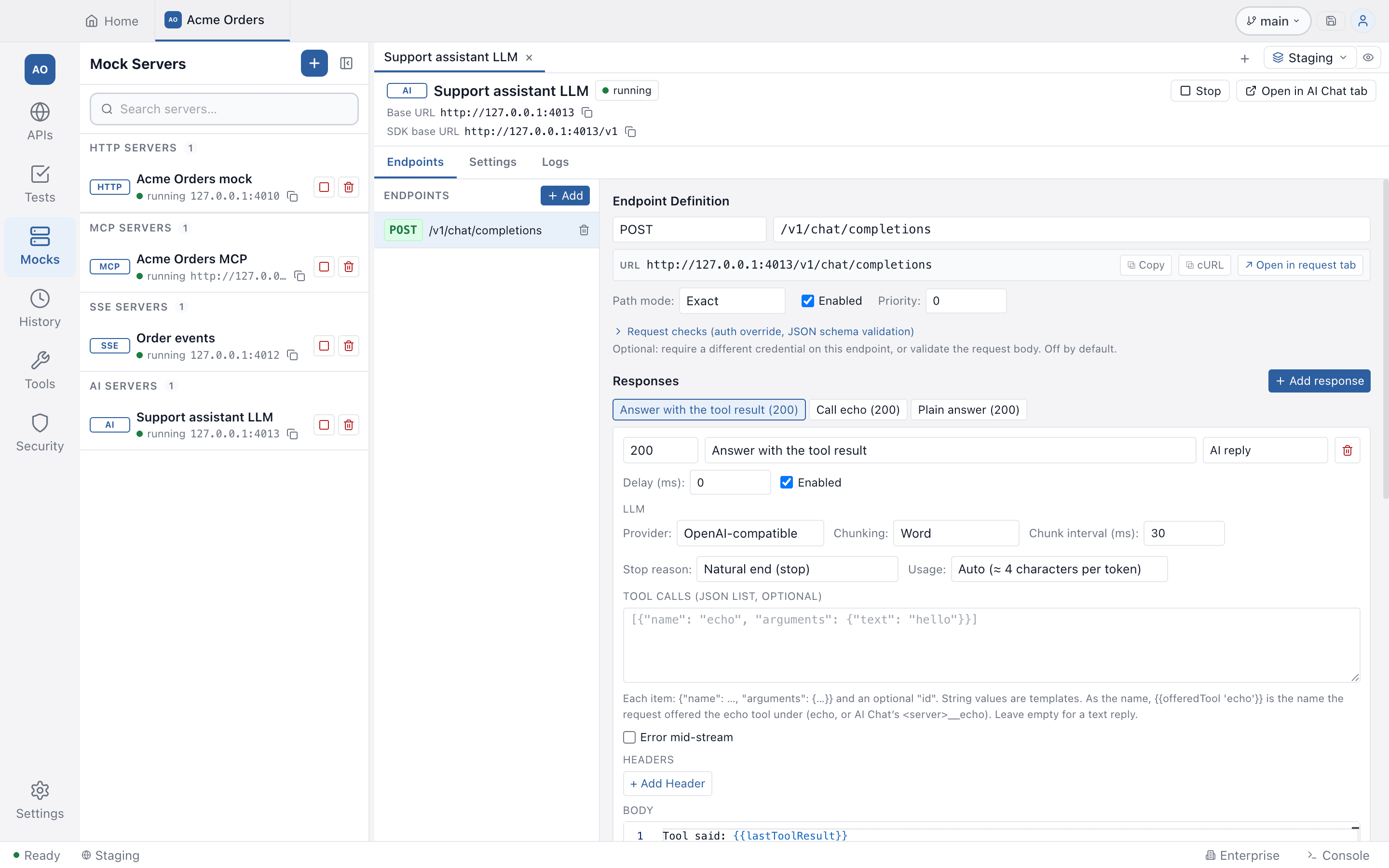
| Setting | Options |
|---|---|
| Provider | OpenAI-compatible or Anthropic wire format |
| Chunking | Word (default), Character, Sentence, Fixed size (default 8 characters) or Whole message |
| Chunk interval (ms) | Pause between chunks, default 30 |
| Stop reason | Each provider’s own values, written the way that provider names them: OpenAI stop, length, content_filter, tool_calls; Anthropic end_turn, max_tokens, stop_sequence, refusal, tool_use. For Anthropic stop_sequence you also set the sequence (default END) |
| Usage | Auto (about 4 characters per token) or Custom input and output token counts |
| Tool calls | A JSON list of {"name": ..., "arguments": {...}}, optional "id"; strings in them are templates. A reply with tool calls always stops with the tool-call reason. Up to 16 per reply |
| Error mid-stream | See below |
{{offeredTool 'echo'}} gives the name under which the request offered the echo
tool: echo, or <server>__echo when Testnizer’s AI Chat added an MCP server’s
tools. The tool-call presets use it.
Token usage is part of the reply: on the final chunk of a streamed OpenAI reply,
and in the message_start and message_delta events of an Anthropic stream. With
stream_options.include_usage, an OpenAI stream also sends OpenAI’s own usage
chunk, so a client that adds up usage across chunks counts it twice.
Failing on purpose
Beyond the error presets, any streamed response can fail part-way through. Turn on Error mid-stream, choose the number of chunks to send before the error and the error Type and Message:
- OpenAI-compatible: after that many chunks of text or tool arguments, an
unnamed
data: {"error": {...}}event is sent and the stream closes, without a finish chunk or[DONE]. Empty type and message use OpenAI’s ownserver_errortext. - Anthropic:
event: errorwith{"type": "error", "error": {...}}is sent and the stream closes, withoutmessage_deltaormessage_stop. Empty type and message useoverloaded_error/ “Overloaded”.
Only streamed replies are affected; a plain JSON reply is not. This is the case that tests whether a client keeps the text it already received and shows the error after it. Testnizer’s own AI Chat does.
Pointing a client at it
- Open in AI Chat tab / Start & open in AI Chat tab opens Testnizer’s AI
Chat on the first
POST .../chat/completionsendpoint with the provider set to a custom URL and the modelmock-model. Open in AI Chat (Anthropic) does the same for aPOST .../messagesendpoint on the Anthropic provider. - A chat tab opened from a mock does not load your saved provider key, so a
real key never goes to a server that is not the provider. A key you type in that
tab is used in that tab only. If you point an AI Chat tab at the mock yourself on
the Anthropic provider, your saved key is sent as
x-api-key, which is harmless on localhost, but a token you type there replaces the saved key. - Any SDK: use the SDK base URL from the header and any API key text, unless you switched authentication on.
Limits
A streamed reply is limited the same way as an SSE stream: at most 10,000 chunks, 64 open streams per server, and an oversized chunk is an error. Cut the text in bigger chunks (Sentence, Fixed size or Whole message) if you hit the chunk limit.
In the Logs tab a stream is one row, marked streaming… until it closes.
Related
- AI Chat: the client side, including MCP tools in chat
- MCP mock server: pair it with the tool-call presets