
MQTT
Connect to MQTT 3.1.1 and 5.0 brokers, subscribe to topics, publish messages, set a Last Will, and watch the message log.
Testnizer ships an embedded MQTT client (MQTT.js) running in the Node main process. The renderer receives events over IPC and never holds an open socket itself. It speaks MQTT 3.1.1 and 5.0 and mirrors the layout of Postman’s MQTT request, so a Postman v3 MQTT request imports and exports without losing its fields.
Opening an MQTT tab
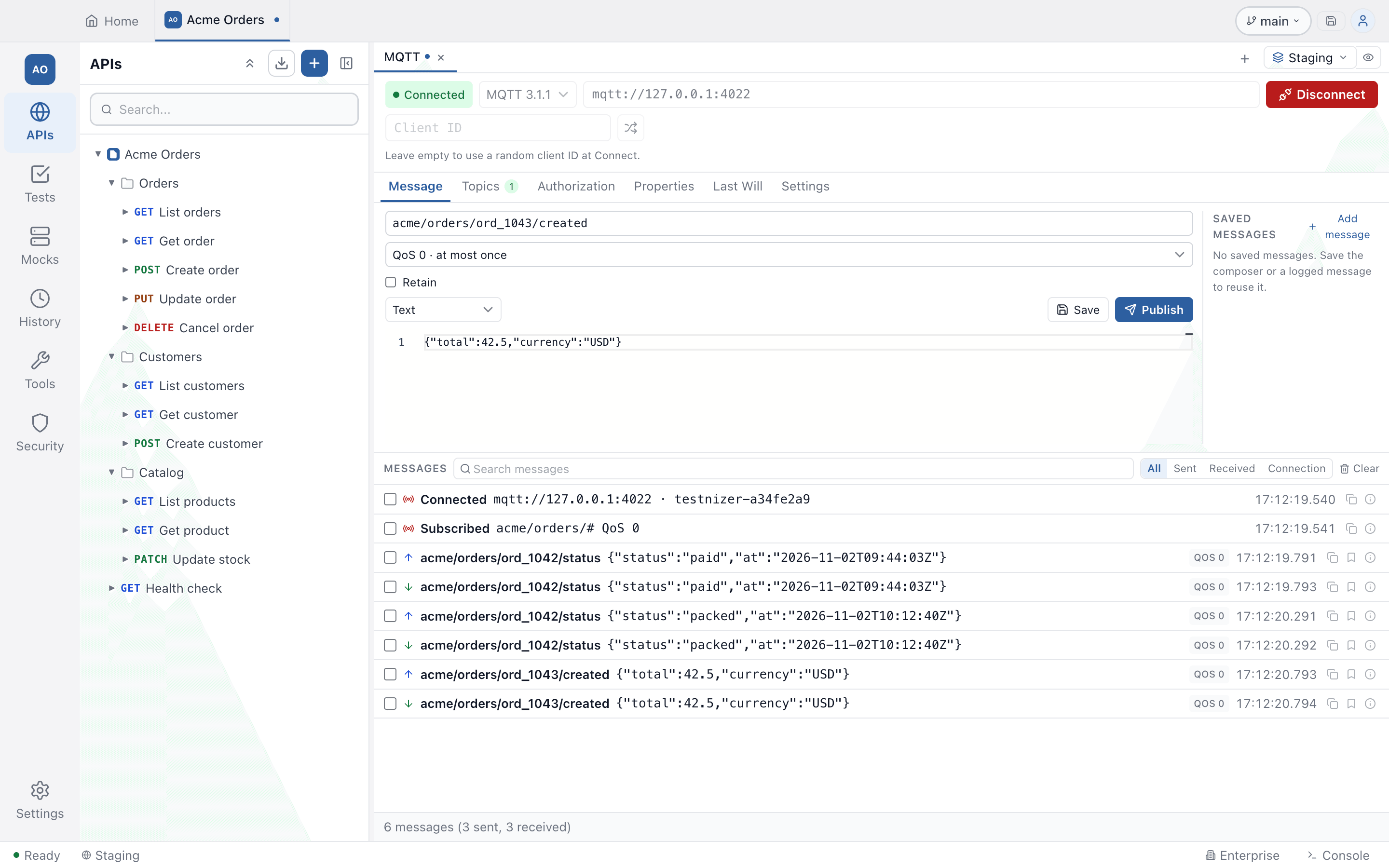
Click + New → MQTT. The editor has a connection bar at the top, request tabs under it (Message, Topics, Authorization, Properties, Last Will, Settings) and the message log below.
Connecting
| Field | Notes |
|---|---|
| MQTT version | MQTT 5.0 (default) or MQTT 3.1.1 |
| Broker URL | mqtt://, mqtts:// (TLS), ws:// or wss:// (MQTT over WebSocket), for example mqtt://broker.example.com:1883. A bare host:port is treated as mqtt://. {{variables}} resolve at Connect |
| Client ID | Random when left empty. The Generate a random client ID button fills one in |
Click Connect. The status pill shows the connection state; Cancel appears while connecting, and Disconnect while connected. A connection that fails before the broker accepts it (a refused CONNACK, a bad password, a timeout) shows the error beside the button and is not retried — automatic reconnection only starts after a connection has succeeded, and only if you turn it on in Settings.
For mqtts:// and wss:// brokers, Testnizer uses the project’s
client certificates for that host, the same ones HTTP uses.
Settings → Enable server certificate verification controls whether the
broker’s certificate is checked. A custom proxy set in Project Settings or Settings is
used for MQTT too (TCP brokers included); hosts in Bypass for hosts connect directly.
Message tab: publishing
| Control | Notes |
|---|---|
| Topic | The topic to publish to; {{variables}} resolve at Publish |
| Quality of service | QoS 0 (at most once), QoS 1 (at least once), QoS 2 (exactly once) |
| Retain | Ask the broker to keep the message for future subscribers |
| Message format | Text, JSON, XML, HTML, Base64 or Hexadecimal. Base64 and hexadecimal content is decoded and published as raw bytes |
| Beautify | Pretty-prints JSON, XML or HTML in the composer |
| Message properties | MQTT 5.0 only: content type (MIME), response topic, correlation data, message expiry, topic alias, payload format indicator and user properties |
| Save | Stores the composer as a saved message (right-hand pane) |
| Publish | Sends the message |
Saved messages keep topic, QoS, retain, format, payload and properties. Click one to load it into the composer, double-click to rename it, or use Save as a saved message on a logged message. They are saved with the request (Ctrl+S) and travel in a Postman v3 export.
Topics tab: subscribing
Add a topic filter (wildcards + and # work, for example
sensors/+/temperature). A topic with Subscribe on is subscribed when you
Connect. While connected, turning Subscribe on or off subscribes or
unsubscribes at once; a subscribed row cannot be renamed. A topic you add
while connected starts with Subscribe off — type its name, then switch it on.
Each topic has a QoS and a description. On MQTT 5.0 the Subscription options are also available: No local (do not receive your own messages), Retain as published, and Retained messages (Send on subscribe, Send on new subscription only, or Do not send).
Authorization, Properties, Last Will and Settings
- Authorization — Username and Password, sent in CONNECT. The
password is never written to the browser storage, History or the Console (see
Where your data goes); use a
{{variable}}to keep it after a restart without saving the request. - Properties — MQTT 5.0 CONNECT properties: Session expiry, Receive maximum, Maximum packet size, Request response information and User properties. An empty property is not sent. On a 3.1.1 connection the tab says these are MQTT 5.0 only and Testnizer sends none of them.
- Last Will — a message the broker publishes if the connection drops without a Disconnect. It is sent only when the Will topic is set; it has its own QoS, Retain, format and payload, and on MQTT 5.0 its own properties (including Will delay). A Disconnect you click sends a proper DISCONNECT, so the will is not published.
- Settings — Enable server certificate verification, Connection timeout (ms, default 30 000), Keep-alive (s, default 60, 0 = off), Clean session (on by default) and Reconnect automatically when the connection drops (off by default; when on it retries every second until it succeeds or you disconnect). Settings are locked while connected and apply on the next Connect.
The message log
Messages sent and received appear in one timeline, with connection events (Connected, Subscribed, Subscription refused, Unsubscribed, Connection lost, Reconnecting, Reconnected, Disconnected by the broker, with the broker’s reason code, Publish failed). It is the same log as the WebSocket and Socket.IO editors: search, filter (All, Sent, Received, Connection), copy message, select two entries to compare the time between them, a Hexdump view for binary payloads and Wrap lines. Received messages are kept in memory only; they are not written to disk.
Connection lifetime
An MQTT connection belongs to its tab. Closing the tab disconnects, and so does leaving the project (switching project or going Home): a connection must not keep receiving into a project you cannot see. The same rule applies to WebSocket and Socket.IO tabs. Reconnect when you come back.
Where your data goes
- The password, a credential-named user property and
user:password@or?token=in the broker URL are not written to localStorage. A saved request stores them; an unsaved tab asks you to type them again after a restart. - History and Console record the request with the password masked, and keep the
{{variable}}template so a request can be re-sent.
Postman v3
An MQTT request imports from a Postman v3 collection (folder or JSON) with its connection, MQTT 5.0 properties, Last Will, topics with subscription options, Basic auth and saved messages, and exports back the same way. Details v3 has no field for are reported on export: XML and HTML payload formats (exported as text), disabled message user properties and an unsaved composer draft. An MQTT version Testnizer does not know imports as 5.0, with a note in the import report.
What Testnizer does not do
- No Visualization. Postman’s per-topic charts are not available.
- No automatic reconnection by default. It is a setting, off by default, so that drops are visible while you test.