
HTTP mock server
A real HTTP server you configure in Testnizer - endpoints, conditional responses, templating, scripts, auth, failure injection, rate limit, CORS, a recording proxy, and OpenAPI / Postman import.
An HTTP mock server answers REST-style requests with the responses you define. For what a mock server is and how to create, start and open one, see the overview. This page covers the HTTP kind: endpoints, responses, templating, scripts and the settings that shape every answer.
The new-server dialog offers these starting points for an HTTP mock:
| Preset | What it creates |
|---|---|
| Blank | No endpoints |
| REST example | GET/POST /users, GET/DELETE /users/:id; ids 1-3 exist, any other id gets 404 |
| Echo | ANY /echo answers with the method, path, query, headers and body it received |
| Auth required | Needs a generated bearer token (shown in the server settings), otherwise HTTP 401; GET /public stays open |
| Faults | GET /slow answers after 1500 ms; failure injection fails about one request in three with HTTP 500 |
| Import a file | Builds the endpoints from an OpenAPI or Postman file (see Importing existing specs) |
The editor has three tabs: Endpoints, Settings and Logs.
Endpoints
The Endpoints tab is split into a left list and a right editor.
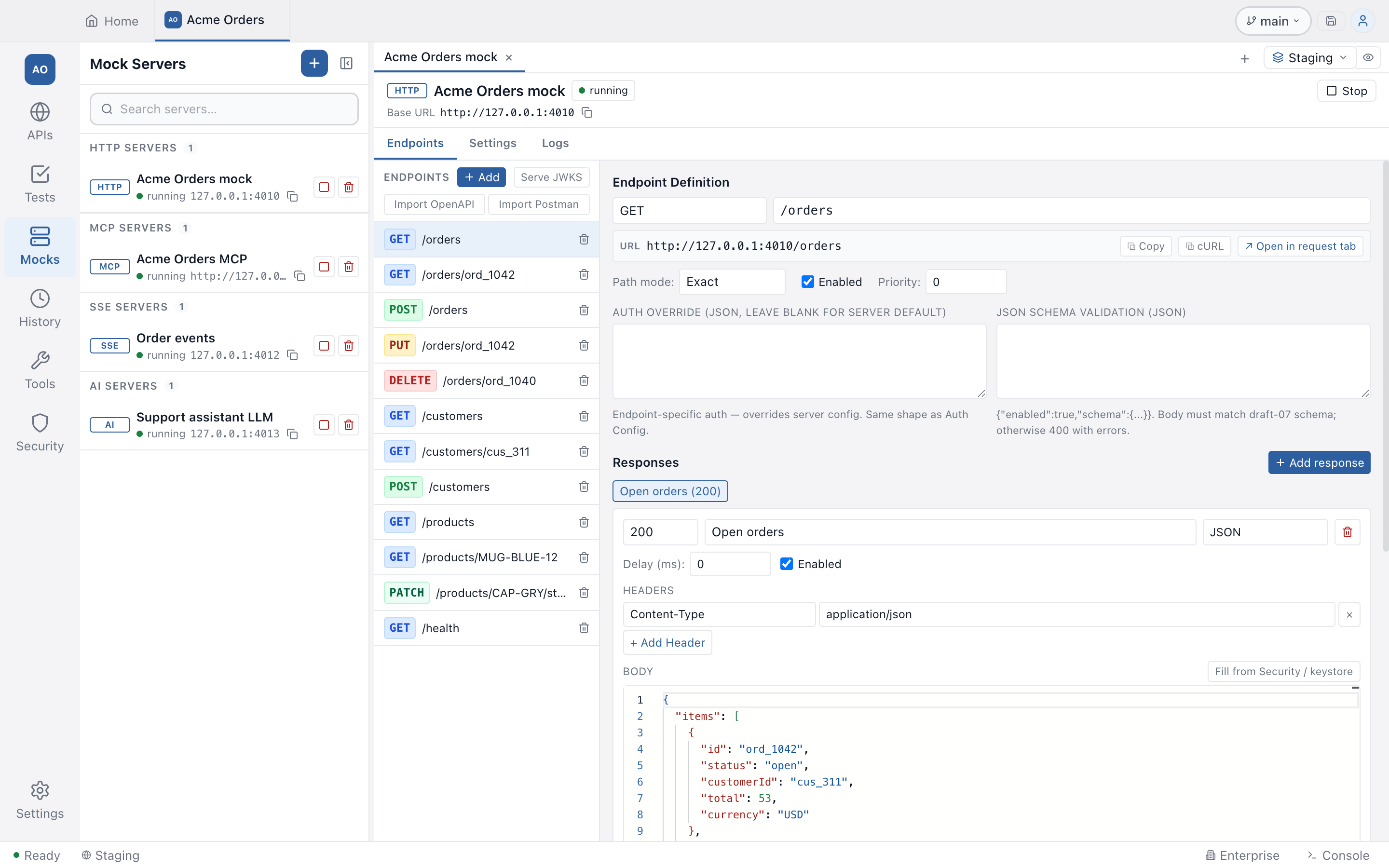
Method and path
Path matching has four modes:
| Mode | Pattern | Example | Matches |
|---|---|---|---|
exact | literal | /users | only /users |
param | :name placeholders | /users/:id | /users/42 (id = “42”) |
wildcard | * (segment), ** (any) | /api/*, /api/** | one segment / any depth |
regex | full RegExp with named groups | ^/v(?<v>\d+)/users$ | /v3/users (v = “3”) |
The HTTP method can be any standard verb (including HEAD, OPTIONS and
QUERY) or ANY, which matches every method.
When several endpoints would match, Testnizer picks the one with the higher
priority and breaks ties by specificity: exact > param > regex >
wildcard. A request that matches no endpoint gets 404 (unless the echo or
proxy mode below handles it). An endpoint without an enabled response answers
501.
The full URL is shown in a bar under the path field. From there you can:
- Copy the
http://host:port/basePath/pathURL - Copy as cURL to get a working
curlcommand (with a placeholderContent-Typeand body for POST/PUT/PATCH) - Open in request tab to open the endpoint as an ordinary HTTP request that
you can Send and Save, with any method.
exactandparampaths open; for a:parampath the tab opens with its path variable rows to fill in and does not send. Wildcard and regex paths have no single URL, so the button is disabled with the reason. If the server is stopped, the button starts it first (Start & open in request tab).
The Base path in Settings is a prefix for every endpoint of the server.
Responses and conditions
Each endpoint can have many responses. When a request arrives, Testnizer walks the response list in order and picks the first one whose condition matches. If none match, the first enabled response is used as a fallback.
A response has a name, a status code, an optional Delay (ms), headers, a body and a body type (JSON, XML, Text or HTML on an HTTP server; see the SSE and AI pages for the two streaming types).
Conditions are JSON objects with a type discriminator. Use the Insert
example… dropdown next to the Condition field to drop in a working template.
| Type | Use it when | Example |
|---|---|---|
always | this is the catch-all/default response | {"type":"always"} |
header | a request header has a specific value | {"type":"header","name":"X-Tenant","op":"eq","value":"acme"} |
query | a query string parameter matches | {"type":"query","name":"locale","op":"eq","value":"tr"} |
pathParam | a :name segment matches | {"type":"pathParam","name":"id","op":"eq","value":"42"} |
jsonPath | a value inside the JSON request body matches | {"type":"jsonPath","path":"$.user.role","op":"eq","value":"admin"} |
xpath | an XPath expression on the XML body matches | {"type":"xpath","expression":"//Order/Status/text()","op":"eq","value":"PAID"} |
method | filter by HTTP verb (useful with ANY) | {"type":"method","method":"POST"} |
and / or | combine predicates | {"type":"and","conditions":[...]} |
Operators: eq (string equality), neq, contains (substring), regex
(JavaScript RegExp), exists (path resolves / value present).
Examples
Return 200 for admins, 403 for everyone else - two responses on the same endpoint:
// Response 1 - condition
{
  "type": "jsonPath",
  "path": "$.role",
  "op": "eq",
  "value": "admin"
}
// Response 1 - body
{ "allowed": true }
// status: 200

// Response 2 - condition
{ "type": "always" }
// Response 2 - body
{ "error": "forbidden" }
// status: 403
Return Turkish content when ?locale=tr:
// First response - condition
{ "type": "query", "name": "locale", "op": "eq", "value": "tr" }
// body: { "greeting": "Merhaba!" }

// Default
{ "type": "always" }
// body: { "greeting": "Hello!" }
Multi-tenant routing - header AND body match:
{
  "type": "and",
  "conditions": [
    { "type": "header", "name": "X-Tenant", "op": "eq", "value": "acme" },
    { "type": "jsonPath", "path": "$.user.role", "op": "eq", "value": "admin" }
  ]
}
Templating
Response bodies and header values are rendered through Handlebars plus the same dynamic variables that requests use. Available bindings:
request.method,request.path,request.headers.<name>(case-insensitive),request.query.<name>,request.params.<name>,request.body.<field...>,request.bodyText- Handlebars helpers:
{{#if}},{{#each}},{{lookup}}, plus the built-inseq,neq,upper,lower,default,json - Dynamic values:
{{$timestamp}},{{$isoTimestamp}},{{$randomUUID}},{{$randomInt}},{{$randomInt(1,100)}},{{$randomEmail}},{{$randomString}},{{$randomString(16)}}, and the other Postman dynamic variables. An unknown{{$name}}stays as written. - Project variables:
{{name}}, from the project’s Globals and the active environment, read for each request. A secret variable stays as the literal text{{name}}, so a request to the mock cannot read it. - For AI replies,
{{lastUserMessage}},{{lastToolResult}}and{{model}}(see the AI mock server).
To print {{ as text, put a backslash in front of it.
Example body:
{
  "id": "{{$randomUUID}}",
  "echoOf": "{{request.body.name}}",
  "createdAt": "{{$isoTimestamp}}",
  {{#if request.body.role}}"role": "{{request.body.role}}"{{else}}"role": "guest"{{/if}}
}
Pre-response script
Each response can carry a JavaScript snippet that runs after templating but before the HTTP response is sent. Use it to mutate state, override the status / headers / body, or gate access with custom logic.
The script runs in a fresh Node vm context with a 5-second timeout and
these bindings:
| Binding | What it is |
|---|---|
request | Frozen snapshot of the request: method, path, headers, query, params, body, bodyText |
state | Mutable object scoped to this server; it survives across requests |
response | Mutable object pre-populated with the picked response: status, headers, body |
console.log / info / warn / error | Captured into the request’s log entry and sent as the x-mock-script-log response header |
setStatus(n) | Override the response status |
setHeader(name, value) | Set a response header (lower-cased) |
setJson(value) | Set body to JSON.stringify(value) and force Content-Type: application/json |
require, process, the file system and the network are not exposed to the
script. This is a convenience, not a security boundary: a Node vm context does
not stop deliberately hostile code, so only run scripts you trust.
If a script throws and has not set its own status, the response is a 500 with
the error message, and the log row shows the error.
Scripts of a project that came from outside (cloned from Git, opened from a
project file, or whose collection import added scripts) do not run until you
allow scripts for that project on this computer. Until then the response is a
500 that says so. See Scripts.
Use the Insert example… dropdown next to the Script field to drop in a working template.
Example: stateful CRUD
A single endpoint that stores incoming POST bodies and returns them on GET:
state.users ??= {}

if (request.method === 'POST') {
  const u = request.body
  if (!u || !u.id) {
    setStatus(400)
    setJson({ error: 'id required' })
  } else {
    state.users[u.id] = u
    setStatus(201)
    setJson(u)
  }
} else if (request.method === 'GET') {
  const id = request.params.id
  if (id) setJson(state.users[id] ?? { error: 'not found' })
  else setJson(Object.values(state.users))
} else if (request.method === 'DELETE') {
  delete state.users[request.params.id]
  setStatus(204)
}
Pair this with method ANY and path /users/:id? (or two endpoints, GET
/users/:id and POST /users) to get a working CRUD stub.
Example: counter that increments on every call
state.calls = (state.calls ?? 0) + 1
setJson({ count: state.calls, ts: new Date().toISOString() })
Example: random failure (chaos testing)
if (Math.random() < 0.2) {
  setStatus(500)
  setJson({ error: 'random_failure' })
} else {
  setJson({ ok: true })
}
You can also use the Failure Injection panel in Settings for the same effect without code.
Example: status from query string
Useful when stress-testing how a client reacts to arbitrary HTTP codes:
const code = Number(request.query.code)
if (Number.isFinite(code) && code >= 100 && code < 600) {
  setStatus(code)
  setJson({ requestedStatus: code })
} else {
  setJson({ ok: true, hint: 'Add ?code=NNN to override status' })
}
Example: round-robin sequential responses
const replies = [
  { status: 200, body: { ok: true, n: 1 } },
  { status: 200, body: { ok: true, n: 2 } },
  { status: 503, body: { error: 'try again' } },
]
state.idx = ((state.idx ?? -1) + 1) % replies.length
const r = replies[state.idx]
setStatus(r.status)
setJson(r.body)
Authentication, validation, failure, rate limit
The Settings tab carries the server-wide checks. They run in this order for each request, and a failing check answers instead of the endpoint’s response, before any script: CORS preflight, rate limit, endpoint match, authentication, JSON Schema validation, failure injection.
Authentication
JSON config field. Supports four types:
// no auth
{ "type": "none" }

// Bearer
{ "type": "bearer", "tokens": ["secret-1", "secret-2"] }

// Basic
{ "type": "basic", "users": [{ "username": "alice", "password": "wonderland" }] }

// API key (header or query)
{ "type": "apiKey", "in": "header", "name": "X-API-Key", "keys": ["k1", "k2"] }
A failed check answers 401 with a WWW-Authenticate challenge. An entry with
an empty token, password or key never matches, so a mock whose secrets are blank
(for example after a pull, because secrets are not written to files) refuses
requests until you set them again.
Each endpoint can override the server-level auth from the Auth Override field in the endpoint editor (leave it blank to inherit). The override and the JSON Schema validation below sit under Request checks, which is off by default.
JSON Schema body validation
Per-endpoint JSON config. When enabled, the request body must match a draft-07 schema or the server returns 400 with the validation error details:
{
  "enabled": true,
  "schema": {
    "type": "object",
    "required": ["email"],
    "properties": {
      "email": { "type": "string", "format": "email" }
    }
  }
}
Failure injection
Probabilistic 5xx or timeout simulation:
{
  "enabled": true,
  "probability": 30,
  "mode": "status",
  "status": 503,
  "timeoutMs": 30000
}
Modes: status (return status, default 500, with an injected error body),
timeout (wait timeoutMs, default 30000, then return 504), random (50/50
between the two). probability is 0 to 100.
Rate limit
A fixed window per client address or for the whole server:
{
  "enabled": true,
  "requestsPerWindow": 100,
  "windowMs": 60000,
  "scope": "ip"
}
scope is ip or global. Above the limit, the server returns 429 with a
Retry-After header.
CORS
When enabled, the server answers OPTIONS preflight requests itself and adds the
CORS headers to its responses. Configure the allowed origins, methods, headers,
credentials and Access-Control-Max-Age in the Settings tab.
Special modes
Echo
When Echo endpoint at /__echo is on, requests to /__echo (any method) reply
with a JSON dump of the request, which is handy for debugging client behaviour:
curl -X POST 'http://127.0.0.1:3001/__echo' \
  -H 'Content-Type: application/json' -d '{"hello":"world"}'
# {
#   "method": "POST",
#   "path": "/__echo",
#   "headers": { "content-type": "application/json", ... },
#   "query": {},
#   "body": { "hello": "world" }
# }
Proxy passthrough
If Proxy unmatched requests to upstream is on and a request matches no
endpoint, it is forwarded to the Proxy target URL and the upstream response is
returned unchanged. Use it to mock the new endpoints and pass everything else
through. An unreachable upstream answers 502.
Recording
Record proxied responses as new endpoints (with the proxy on) saves every passed-through response as a new mock endpoint. Call your real API once to record it, then switch the proxy off and replay it without a network.
Importing existing specs
There are three ways to build endpoints from an existing description.
When you create the server: choose Import a file in the New mock server dialog. It accepts an OpenAPI 3.x or Swagger 2.0 spec, or a Postman v1, v2.x or v3 collection, in JSON or YAML (up to 50 MB). The file is checked first: it is recognised, you see what it holds, and a file that is not a spec or has nothing to mock is refused before a server exists.
On the Endpoints tab of an existing HTTP server:
- Import OpenAPI takes a JSON or YAML file. Testnizer dereferences internal
$refs and creates one endpoint perpaths.<path>.<method>. Response bodies come fromexamplesfirst, thenexample, then a sample generated from the schema, includingallOf,oneOfandanyOf. Swagger 2.0 responses keep their bodies, and a schema that refers to itself no longer stops the import. A$refin the spec cannot read a local file or call a URL. - Import Postman takes a Postman v1, v2.x or v3 collection, in JSON or YAML. Folders are walked recursively. Each saved example response becomes a mock response.
An endpoint binds the spec’s server path too: with the server
https://api.example.com/v1, /pets answers at
http://127.0.0.1:<port>/v1/pets, so a client only changes its host. If the mock
has its own base path, that part is not repeated. Endpoints imported by an older
build keep their paths.
{{var}} placeholders from Postman URLs become :var path params. A
{{baseUrl}} at the start of a URL is left out, since its value belongs to an
environment.
Anything an import had to leave out is listed in the message it ends with.
From saved requests: Create Mock Server from this folder / project / request in the APIs panel builds a mock the same way from saved requests; see the overview.
Serving a JWKS
A mock endpoint can serve a JSON Web Key Set, so you can test token validation
against a local issuer. In the Endpoints list, Serve JWKS publishes a key at
the well-known path: it creates an ordinary GET endpoint with one response.
In a JSON response body, Fill from Security / keystore builds a JWKS from a key
in the Security tools or your keystore and writes it into the body. Only public
keys are published; private members are never included. Serve the body from a
GET /.well-known/jwks.json endpoint, and pick again to add a rotation key. The
button is offered on HTTP servers only. See JWK & JWKS.
Live request log
The Logs tab shows the latest 500 requests the server handled. Click a row to see the request headers and body and the response headers and body. Use Refresh and Clear at the top.
When a script throws, the error message appears in the row’s error field.
Console output from console.log and friends is added to the response’s
x-mock-script-log header, so you can see it next to the body.