
SSE mock server
A mock Server-Sent Events stream you define event by event - timing, ids, heartbeat, loop, Last-Event-ID resume, and a deliberate error half way through.
An SSE mock server streams the events you write, on a schedule you set. Point
the SSE editor, a browser EventSource or your own client
at it to test how they handle ids, reconnects, silence and errors, without a
real backend.
It runs on the same HTTP engine as the HTTP mock server, so endpoints, conditions, templating, authentication and the Logs tab work the same way. What is different is the response: an endpoint’s response has the body type SSE stream, and the editor shows a Stream row next to the body.
For creating, starting and opening mock servers in general, see the overview.
Presets
Choose a preset in the New mock server dialog (type SSE), or start from Blank:
| Preset | What it creates |
|---|---|
| Ticker | GET /events: a tick event every second with a growing id, until the client leaves |
| Finite replay | GET /events: five fixed events (ids 1-5), then close. Last-Event-ID resumes after that id; the last id gets 204 |
| Notifications feed | GET /notifications: named events (order, message, alert) with JSON data every 2 s, plus GET /notifications/unread as plain JSON |
| Slow / heartbeat | GET /events: the first event after 1500 ms, then one every 10 s, with a : keep-alive comment every 5 s |
Add on the Endpoints tab creates GET /events with a ticker body. You can
also paste a captured stream into the body.
The body
The body is raw SSE text. Testnizer splits it on blank lines and writes each
block to the wire exactly as you typed it, followed by one blank line. It does
not parse and rebuild events, so a block with only retry:, an id: that
resets the id, a : comment and multi-line data: all go out as written.
id: 1
event: order
data: {"id": 1, "total": 42}

id: 2
event: order
data: {"id": 2, "total": 7}
A block that renders to nothing is skipped and does not count as an event.
Templates
Each block is rendered when it is written, with these extra values:
| Value | Meaning |
|---|---|
{{stream.seq}} | 1-based number of the event on this connection (heartbeats do not count) |
{{stream.iteration}} | 1-based pass over the list; it grows when Loop is on |
{{stream.now}} | ISO time when the event was rendered |
{{request.query.x}} | A query parameter of the request that opened the stream |
Everything from templating works too. Two
limits come from rendering block by block: {{#if}} and {{#each}} cannot span
a blank line, and a rendered value that itself contains a blank line splits the
event. Write JSON data with {{json ...}}, which escapes newlines.
The Stream row
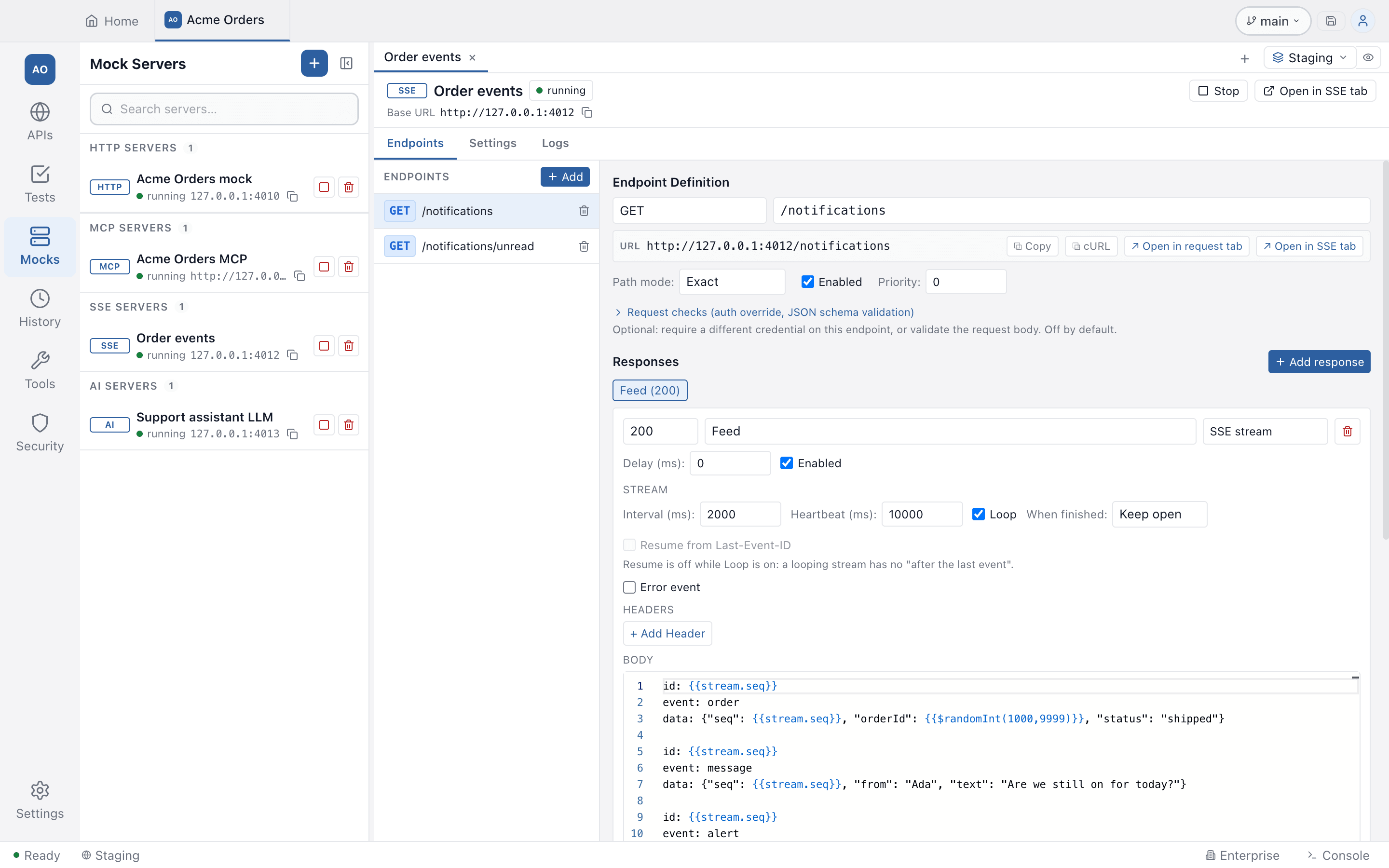
| Setting | What it does | Default |
|---|---|---|
| Interval (ms) | Time between events. The first event goes out at once. Up to 600000 | 1000 |
| Heartbeat (ms) | Writes a : keep-alive comment this often. 0 is off | 0 |
| Loop | Start again from the first event after the last one. A looping stream never writes faster than every 10 ms | off |
| When finished | Close ends the response after the last event; Keep open leaves the connection open (heartbeats keep running) | Close |
| Resume from Last-Event-ID | A client that reconnects with Last-Event-ID continues after that event | on |
A response’s Delay (ms) is the wait before the stream opens.
Resume is switched off, with the reason shown, while Loop is on (a
looping stream has no “after the last event”) and when an id: line uses a
template, because the server could not find a templated id again. When resume is
on and the client sends the id of the last event on a closing stream, the answer
is 204, which stops an EventSource from reconnecting.
Error event
Turn on Error event to make the stream fail on purpose. After the number of
events you set (or as soon as the list runs out, if that comes first), the server
sends an event: error event with the data you give and closes the stream. The
data is a template like any event. The default is {"message": "Mock stream error"} after 3 events. A client that reconnects starts counting from 0 again.
Use it to test that a client shows or retries a server-side failure instead of
treating the stream as finished.
Trying it
- Open in SSE tab on the server header opens Testnizer’s SSE editor on the
first exact-path
GETendpoint; Start & open in SSE tab starts the server first. The SSE tab sendsGET,POST,PUT,PATCHorDELETE. - Open in request tab and the HTTP Send button wait until the stream closes, so use them only for streams that end. For live events use the SSE tab.
- A browser works too: open
http://127.0.0.1:<port>/events, or usenew EventSource(...). The response carriesContent-Type: text/event-stream,Cache-Control: no-cacheand a header that tells proxies not to buffer; headers you set on the response replace these.
A status outside 200-299, or 204, is not streamed: the body goes out once as
written, which lets you mock an error response of an SSE endpoint.
Limits and the log
- A body holds at most 10,000 events, and one event may be at most 64 KiB. An event that renders larger ends the stream with a comment saying why.
- A server keeps at most 64 open or waiting streams. One more gets
503. - In the Logs tab a stream is one row, marked streaming… while it is
open. When it closes, the row shows a preview of what was written (up to 16 KiB,
with credentials masked), and its response headers carry an
x-mock-streamvalue with the number of events sent and the reason the stream ended. - Stopping the server ends its open streams. Editing a running server does not change or close a stream that is already open: it keeps the events it started with.
Related
- SSE editor: the client side
- HTTP mock server: endpoints, conditions, auth