
MCP mock server
A local Model Context Protocol server you define as data - tools, resources and prompts, bearer auth, latency, error scenarios, 2025 and 2026-07-28 clients, and mid-call input requests.
A Mock MCP server is a local MCP server whose tools, resources and prompts are data you edit in the app. Use it to build and test an MCP client, to check how your tooling reacts to errors and slow servers, and to give AI Chat a tool server that needs no installation.
It serves Streamable HTTP at a path you choose (default /mcp) and, if you
switch it on, the older HTTP+SSE transport at <path>/sse. One endpoint
answers both the MCP 2025 clients (the initialize handshake) and the
2026-07-28 clients. For creating, starting and opening mock servers in general,
see the overview.
Presets
Choose a preset in the New mock server dialog (type MCP):
| Preset | What it creates |
|---|---|
| Echo | One echo tool that returns its text argument |
| Auth required | Bearer token required; anything else gets HTTP 401 |
| Error server | Tools that fail with each kind of error |
| Complex schemas | Nested objects, arrays, enums and oneOf |
| Slow | Every request is answered after 1500 ms |
A new server starts with the Echo tool, so it is useful at once. The editor has six tabs: General, Scenarios, Tools, Resources, Prompts and Logs.
Saving
Edits are a draft until you save. A tab with unsaved changes shows a dot, and Save (or Ctrl/Cmd+S, which saves the mock instead of opening the request Save dialog) writes all tabs. Discard unsaved changes drops the draft. If you save items you added but never filled in, the editor asks first.
Changing the host, port, path or the legacy SSE option restarts a running server. Everything else, including tools, resources, prompts and scenarios, applies live.
General
- Host, Port and Path. Port
0picks a free port on every start; the URL in the header shows the one in use. Binding to a non-local host with no authentication shows a warning, because anyone on the network can then call the tools. - Also serve the legacy HTTP+SSE transport (
<path>/sse). - Protocol version pin. Any (negotiate) by default. Choose one of
2025-11-25, 2025-06-18, 2025-03-26, 2024-11-05, 2024-10-07 or 2026-07-28 and the
server offers only that version and turns away clients that ask for another.
Appending
?rev=<version>to the URL overrides the pin for that request. - 2025 clients. Allow (stateless) serves MCP 2025 clients without a session
(no
Mcp-Session-Id,GETandDELETEanswer 405), so they receive no “list changed” notifications. Refuse makes the server modern-only: aninitializegets the JSON-RPC error-32022(unsupported protocol version). With Refuse, the legacy SSE transport is not served. - Cache TTL (ms). How long MCP 2026-07-28 clients may reuse the tool,
resource and prompt lists before asking again.
0means always ask again.
A line in the header shows which protocol eras the server answers now.
Notify list changed sends tools/list_changed to 2026-07-28 listeners and to
legacy SSE sessions, to test a client that has to refresh its lists.
Scenarios
-
Authentication. None, or Bearer token with Generate for a random token. In bearer mode a request without a valid
Authorization: Bearer <token>gets HTTP 401 with aWWW-Authenticatechallenge that points at/.well-known/oauth-protected-resource(RFC 9728), so the MCP OAuth debugger can start from a 401. The token is a secret: it is encrypted in the local database and never written to project files, Git or exports (see the overview). A server in bearer mode with an empty token does not start. -
Latency. A delay in milliseconds added to every JSON-RPC request. A per-tool delay adds on top.
-
Error injection (
tools/call). Choose what a tool call does:Mode Result None The call is answered normally Protocol error (JSON-RPC) A JSON-RPC error object with the code (default -32603) and message you setTool returns an error result A normal result with isError: trueand your messageNever answer (timeout) The call gets no response until the client cancels or the session closes HTTP error The HTTP request that carries the call is answered with a status (default 500) Every Nth call applies the error only to every Nth call (counted per server, or per tool for an override); empty means every call. A tool can have its own Error override, or switch the server setting off for itself.
Tools
Each tool has a name, an optional title and description, an Input schema
(JSON Schema, "type": "object") and a response. The schema is advertised to
clients as you wrote it, and the call arguments are validated against it
(draft-07 by default; a schema that declares $schema 2019-09 or 2020-12 uses
that dialect; format is not enforced).
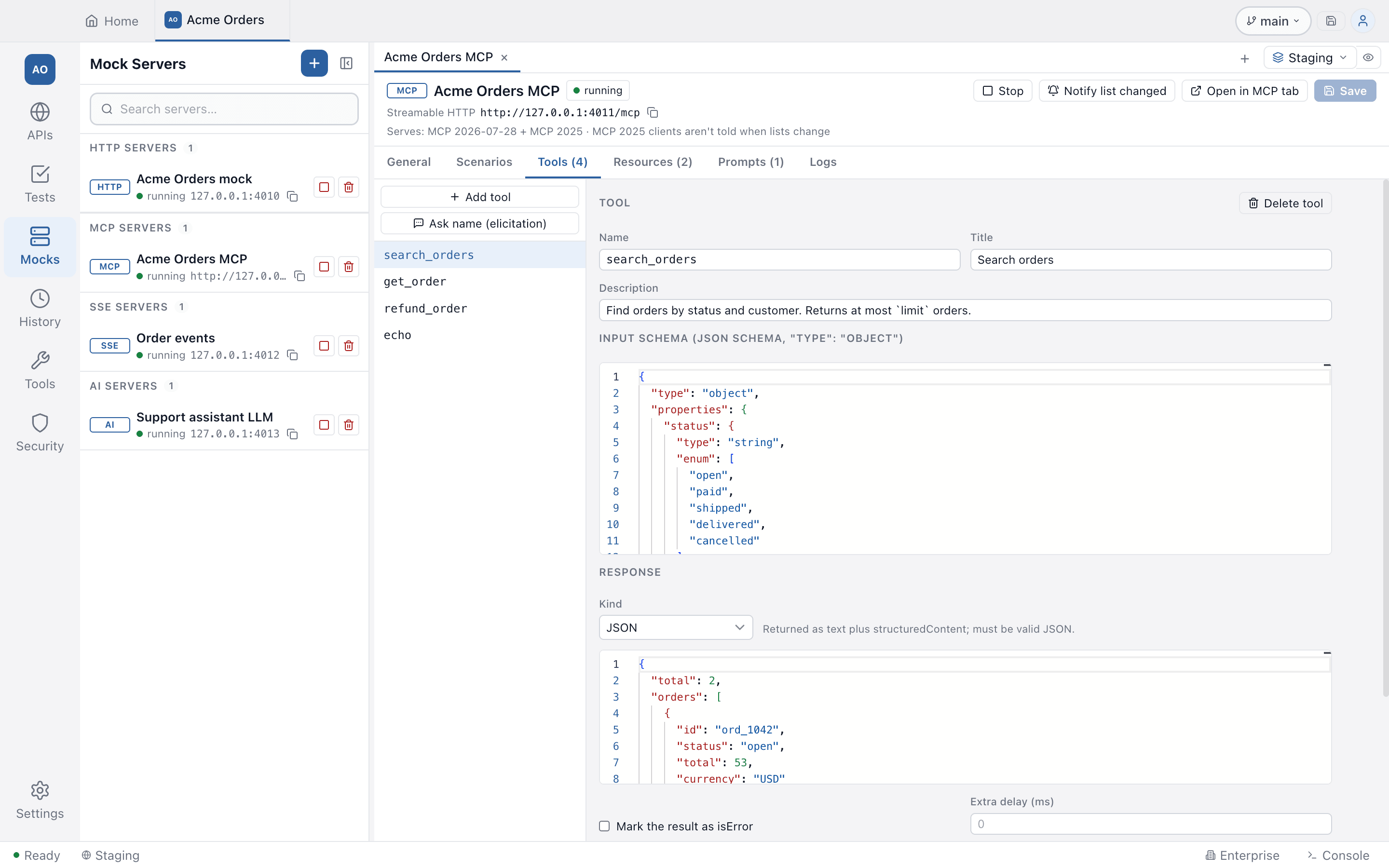
The response Kind is one of:
- Text: returned verbatim as one text content block.
- JSON: returned as text plus
structuredContent. It must be valid JSON; a value that is not an object is wrapped as{ "result": ... }. - Template: rendered for each call. Variables:
{{args.x}}(a call argument),{{now}}(ISO time),{{timestamp}}(epoch ms),{{uuid}},{{$randomUUID}}and the other dynamic variables,{{tool}}(the called tool name),{{headers.x}}(a request header, lower-case name) and the variables of the active environment.
Mark the result as isError makes the tool return a result flagged as a failure. Extra delay (ms) adds latency for that tool.
Asking the client for input
A tool can ask for input before it answers (Ask for input (MCP 2026-07-28)).
Give it a key and a message, then add fields (string, number, integer, boolean or
enum). A 2026-07-28 client gets an input_required result first, shows a form,
and retries the call with the answer; the accepted values are available to the
response as {{input.<field>}}, and you can set a separate response template for
after the answer. An MCP 2025 client gets a short text note instead, because the
mock never pushes a server-initiated request. The preset tool Ask name
(elicitation) adds one that asks for a name and then greets with it. The
MCP client shows the form and sends your answer back.
Resources and prompts
- Resources are either a static URI or a URI template with
{var}placeholders, with a name, a MIME type and text content. In a template, the text can read the matched values as{{params.var}}. - Prompts have a name, a description, arguments (each optionally required) and
one or more messages with a
userorassistantrole. The message text can read the arguments as{{args.name}}.
Logs and trying it
The Logs tab lists every JSON-RPC request with its time, method, tool, duration
and result, and the request and response text. The last 500 are kept in memory.
A call that paused for input is marked input_required; hovering a row shows the
protocol era it was served in.
The header shows the Streamable HTTP URL and, with legacy SSE on, the SSE (legacy) URL, each with a copy button. Open in MCP tab opens Testnizer’s MCP client with the URL filled in; Start & open in MCP tab starts the server first.
Related
- MCP client: connect, call tools, OAuth debugger and security scan
- AI mock server: the tool-call presets pair with the Echo preset here